01
Make the estimate.
Add your customer, services and materials. Set your pricing and terms, then make it yours with your logo and branding.
 Velryq
FOR INDEPENDENT PROFESSIONALS & SERVICE BUSINESSES
Price the work, send a branded PDF, and keep track of what customers owe. Start with a customer, a description and a price. Your logo and payment connections can come later.
14 days to try it · Up to 10 estimates and 10 invoices
Create your account, confirm your email and name your workspace. Then make your first draft. Nothing is sent until you choose to send it.
See trial & pricing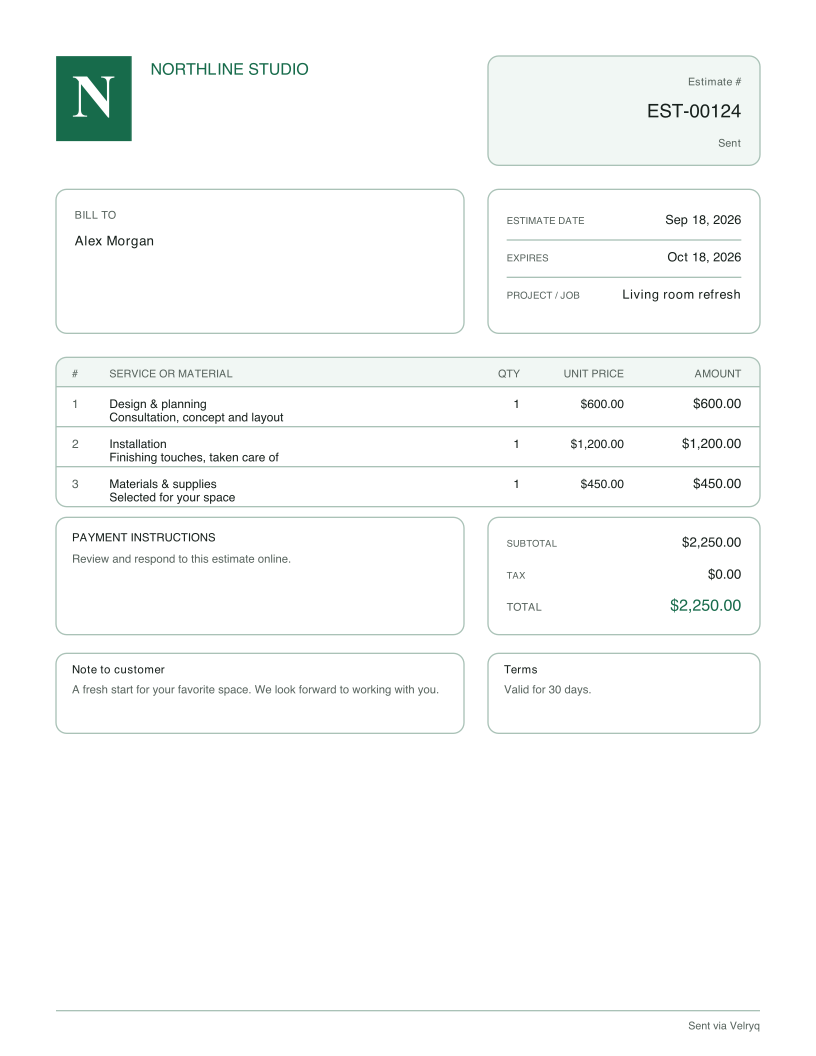
Actual PDF generated by Velryq with sample data. Try the document type and brand colors.
Contractors & trades Independent professionals Creative studios Service businesses
A CLEAR PATH FROM QUOTE TO PAID
One connected workflow for the work you’re winning today.
Add your customer, services and materials. Set your pricing and terms, then make it yours with your logo and branding.
Share a polished PDF and let your customer respond online. Convert an accepted estimate into an invoice without starting over.
Connect Stripe or Square for online payment links, record manual payments, and keep track of what is still due.
SMALL DETAILS. A BIG DIFFERENCE.
Your logo, colors, fonts and document layouts. A consistent first impression, from the estimate to the final invoice.
Keep customers, services and materials ready to reuse. Spend less time filling in the same details for the next job.
Email customer-ready PDFs and keep estimates, invoices and payment history together in your workspace.
START WITH WHAT YOU NEED
Your 14-day trial begins when you create your workspace and includes up to 10 estimates and 10 invoices. Choose a subscription to continue after the trial or its limits.
$19/ month
For winning work and keeping the paperwork simple.
$79/ month
Everything in Invoicing, plus a closer look at missed revenue.
Already have an invoicing system? Recovery is also available on its own for $69/month. Explore recovery
Website subscription prices in USD. Apple subscriptions have separate App Store pricing. Creating an account does not purchase a subscription. Online payments require a connected provider; provider fees apply.
AN EXTRA SET OF EYES
When you want to go further, connect QuickBooks, Stripe or Square to spot overdue invoices, failed payments and missed follow-ups. Review the findings and decide what to do next.
Explore the recovery demoAvailable with Recovery or Full platform. You don’t need recovery connections to create estimates and invoices.
A FEW GOOD QUESTIONS
Yes. Use your own name or trading name for the workspace. Add your logo, saved customers and payment options whenever you need them.
Choose a paid plan to continue creating and sending documents after the trial expires or you reach its allowance. Creating a workspace does not automatically purchase a subscription. Review plans and access in Billing.
No. Create estimates and invoices directly in Velryq. Connect Stripe or Square when you want to offer online payment links. QuickBooks and recovery connections are optional.
Yes. Add your business logo and choose document colors, fonts and layouts for your estimates, invoices and PDFs.
Yes. Customers can respond to an estimate online, and you can convert accepted work into an invoice without re-entering the details.
Yes. Use the website in your mobile browser or the Velryq Sales Docs app for iPhone. Your documents stay connected to your Velryq account.
YOUR WORK DESERVES A GREAT FIRST IMPRESSION
14-day workspace trial · Choose a paid plan when you’re ready